21. Advanced File Archive Research
By this point, you should have some experience finding Quake modifications in FTP archives, CD-ROM collections and surviving mirrors.
The more difficult searches often require looking beyond the files themselves. Historical archives used different directory structures, maintained indexes and upload records, and were copied between servers. These traces can tell you where a missing release once appeared, even when the download is no longer available.
This chapter covers the techniques I use to investigate those traces: searching alternative paths and mirrors, examining archive maintenance files, recognising BBS listings, guessing historical filenames and building searchable collections of evidence.
The aim is to get more information from archives you may already have searched, rather than simply collecting more archive addresses.
Search Alternative Walnut Creek Directory Structures
Chapter 13: Search FTP Archives and File Indexes introduced the Walnut Creek CDROM archive, its historical directory listings and surviving mirrors.
One less obvious area worth investigating is the alternative directory structures used by ftp.cdrom.com over time.
These can reveal historical download locations and archived directories that are missing from the better-known surviving copies of idgames2/.
One complication is that ftp.cdrom.com used different directory structures over time.
Some paths were aliases or symbolic links to other directories. Others reflected changes in how material was organised or mirrored.
Historical references to Quake files might therefore contain very different URLs.
For example:
ftp://ftp.cdrom.com/pub/quake/quakec/...
ftp://ftp.cdrom.com/pub/idgames2/quakec/...
ftp://ftp.cdrom.com/.1/idgames2/...
ftp://ftp.cdrom.com/.3/planetquake/...
These differences matter when searching historical web archives.
A Wayback Machine capture of one directory path does not guarantee that another path was also captured.
When researching a particular file, record every historical URL you discover, even when the paths appear to refer to the same underlying collection.
Investigate the different paths individually.
One variation may have been archived at a useful date when another was not.
You may also discover directory listings that reveal files that have not appeared in your research elsewhere.
Search Historical Mirrors
The best-known surviving mirrors are only the starting point for this investigation.
A more advanced technique is to follow the distribution chain beyond the first mirror.
A server might have mirrored Walnut Creek, while another server mirrored that server. Each layer could preserve different directory structures, filenames or historical snapshots.
Following these relationships can uncover copies and directory listings that are missing from both the original archive and its better-known mirrors.
Investigate Historical cdrom.com Mirror Lists
One particularly important historical source for Quake 1 modifications was the Walnut Creek CDROM (cdrom.com) FTP archive.
The archive hosted a large collection of Quake-related files, commonly encountered under paths such as:
/pub/idgames2/The archive was mirrored by servers around the world. Its welcome message sometimes listed alternative mirrors, including their locations and directory paths.
For example, an archived welcome message from http://www.cdrom.com/pub/idgames2/, captured on 10 February 1997, included entries such as:
         Welcome to the idgames2 archives at this ftp site
    Games using the Quake engine by id Software are covered here

*** ATTENTION: To reduce the load on this machine and           ***
***            provide faster access for all users,             ***
***            please check the following list for a            ***
***            mirroring site closer to you and use it.         ***
***                                                             ***
*** Ohio         ftp.lame.org/mirrors/quake_stuff/              ***
*** Pennsylvania ftp.epix.net/pub/idgames2/                     ***
*** New York     ftp.gamers.org/pub/games/idgames2/             ***
*** UK           sunsite.doc.ic.ac.uk/packages/idgames2/        ***
***              ftp.compulink.co.uk/pub/games/id/quake/        ***
*** Sweden       ftp.sunet.se/pub/pc/games/idgames2/            ***
***              ftp.edu.sollentuna.se/pub/games/quake-stuff/   ***
*** Finland      ftp.sci.fi/pub/idgames2/                       ***
*** Austria      flinux.tu-graz.ac.at/pub/idsoftware2/          ***
*** Poland       ftp.task.gda.pl/pub/games/idgames2/            ***
*** Portugal     ftp.telepac.pt/pub/idgames2/                   ***
*** S. Africa    ftp.global.co.za/pub/quake/                    ***
***              ftp.is.co.za/games/id2/                        **
*** Australia    ftp.powerup.com.au/pub/games/quake/ Brisbane   ***
***              ftp.livewire.com.au/pub/idgames2/   Brisbane   ***
***              ftp.pnc.com.au/pub/idgames2/        Sydney     ***
***              ftp.questnet.net.au/idgames2/       Brisbane   ***
***              ftp.bf.rmit.edu.au/pub/quake/cdrom/ Melbourne  ***
*** Brazil       ftp.iis.com.br/pub/mirror/Quake/               ***
...
Historical mirror lists identify server hostnames, directory paths and geographical locations where copies were distributed. Some of these servers may still have surviving mirrors or archived HTTP directory listings.
Search the listed hostnames and paths to locate additional copies or historical evidence of the archive’s distribution.
This is especially useful for Quake 1 research, where the idgames2 archive and its mirrors were important distribution locations.
Follow Mirrors of Mirrors
An additional complication is that ftp.cdrom.com mirrored other major file collections, including PlanetQuake material.
Some other FTP servers then mirrored directories from ftp.cdrom.com.
This created multiple layers of distribution.
For example, some historical paths associated with the idgames2 and PlanetQuake collections included:
src.doc.ic.ac.uk/public/Mirrors/ftp.cdrom.com/pub/idgames2/planetquake
sunsite.doc.ic.ac.uk/pub/0-Most-Packages/idgames2/planetquake
task.gda.pl/pub/games/idgames2/planetquake
Each represents another location to investigate.
A file originally hosted by PlanetQuake might have been available directly from PlanetQuake, through the Walnut Creek archive and through several mirrors of Walnut Creek.
Each location may have had its own directory structure and historical snapshots.
A file removed from the original PlanetQuake server might still have survived on a secondary mirror.
Likewise, the Wayback Machine might have captured the directory listing of a mirror even if it never captured the original download page.
When you discover that an archive mirrored another archive, treat that relationship as a new research opportunity.
Investigate both the original source and the downstream mirrors.
This is one of the most productive ways to expand a search beyond the obvious download locations.
Search FTP Archive Index and Maintenance Files
Historical FTP archives often maintained special files that documented their contents, recorded recent uploads and described changes to their directory structures.
These files can be particularly valuable because they provide information about releases that are no longer available. A directory listing might contain the original filename of a missing modification. An upload summary might help establish when a file appeared on the server. An archived text collection might preserve a readme that cannot be found anywhere else.
The important thing to understand is that an FTP archive contains more than downloadable software. It may also contain historical records of its own contents and activity.
These files are worth investigating systematically, particularly when researching missing or obscure releases.
Understand the Different Types of Archive Files
FTP archives used different naming conventions and maintained different kinds of supporting files. However, several common types are worth recognising.
Directory listings
These files record the contents of an FTP archive, sometimes including every file and directory on the server.
One common example is:
ls-laR.gz— A compressed recursive directory listing containing filenames, directory paths and associated file metadata.
A recursive listing can be extremely valuable because it allows you to search the contents of an entire historical FTP archive without manually browsing every directory.
Different copies of the listing may represent snapshots taken at different times.
For example, you might discover that actionq2.zip appears in a listing from 1998 but is absent from the surviving modern mirror.
This provides evidence that the file was once present, even if the original download cannot be recovered.
Recent upload summaries
Some archives maintained automatically generated lists of recently added or changed files.
Common examples include:
LAST.24hours— Files added or changed during the previous 24 hours.LAST.7days— Files added or changed during the previous seven days.
These summaries can help establish when a file appeared in an archive.
For example, finding a modification listed in a dated LAST.7days report might narrow its arrival on the server to a particular week.
Be careful when interpreting this evidence. An upload date is not necessarily the original release date. A file might have been uploaded to a mirror days, weeks or months after the developer first distributed it.
Text and description archives
Some FTP archives collected the text documentation associated with their downloadable files.
An important example is:
00alltxt.tar.gz— A compressed collection of text descriptions associated with files in the archive.
This is particularly useful because the descriptions may survive even when the corresponding software has disappeared.
These records may reveal:
- Original filenames.
- Project names and descriptions.
- Version numbers.
- Developer names.
- Release dates.
- Installation instructions.
- References to related files or earlier releases.
Search these descriptions using project names, filenames, developer aliases and distinctive phrases.
You might find information about a release that never appeared in your earlier research.
Filename indexes
Some archives maintained specialised indexes to help users locate files.
For example:
00find.gz— A historical index of text filenames associated with the archive.
These indexes are useful because they allow you to search historical file inventories without browsing the complete directory structure.
They may also preserve references to files that have since been removed, renamed or lost.
Archive maintenance and change records
Some FTP archives recorded changes to their own organisation.
For example:
CHANGES— A record of changes to the archive’s contents or directory structure.
These files can explain why a directory disappeared, why files were moved or why a historical URL no longer corresponds to the surviving directory structure.
This is particularly useful when reconstructing the history of an archive that operated for many years.
Upload and staging directories
Some FTP archives maintained directories for newly submitted files or material awaiting review.
Common examples from the Walnut Creek archive include:
incoming/— Newly uploaded material awaiting moderation or placement.newstuff/— Recently added or processed material.
These directories are worth investigating because they may contain files that never appeared in the main archive.
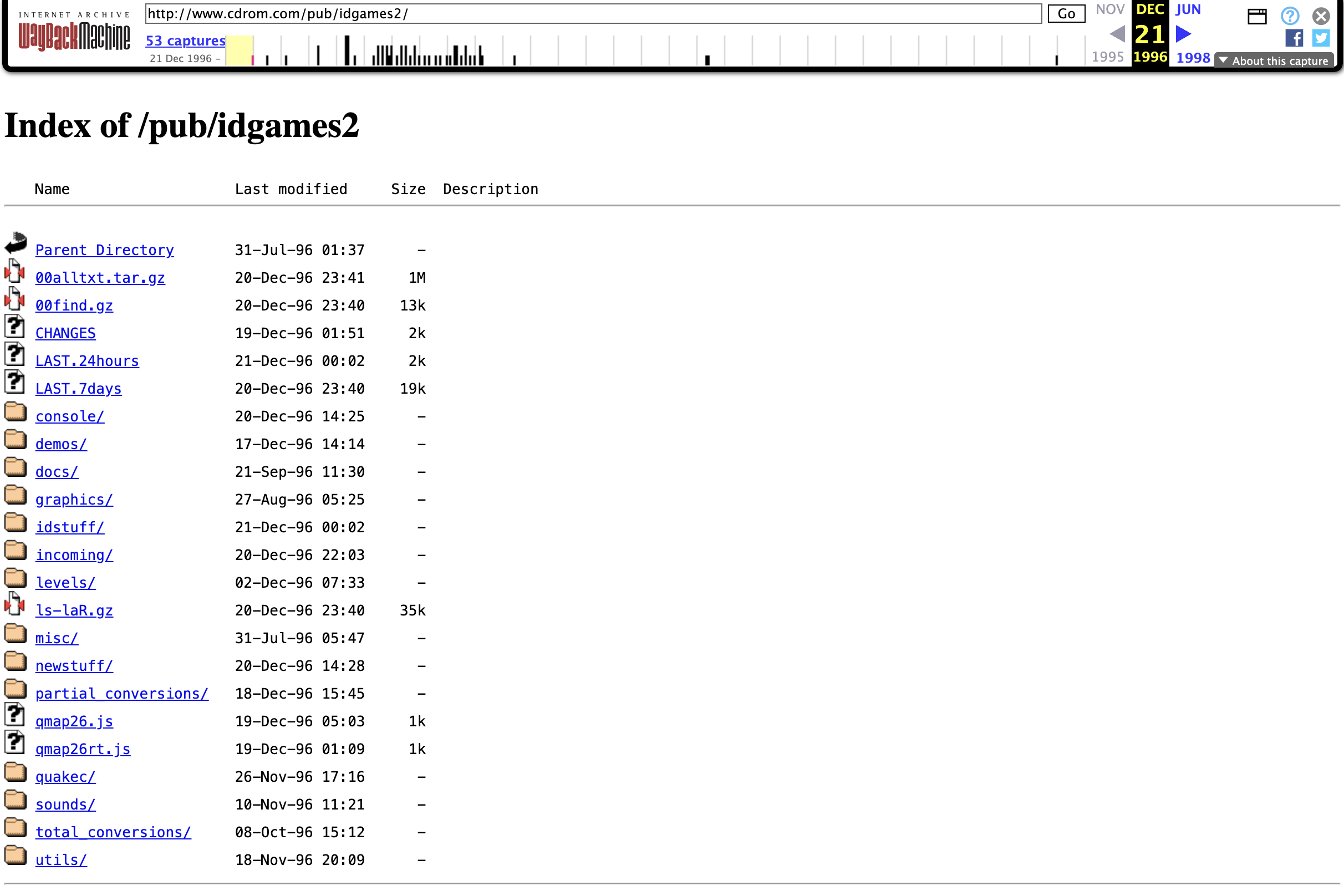
Figure: A listing of the Walnut Creek CDROM archive showing special files and directories alongside Quake files.
You might discover an early beta, an alternative version, an incorrectly named upload or a submission that was never incorporated into the published collection.
However, do not assume that every file in an incoming/ directory represents an official public release. Some submissions may have been incomplete, rejected or uploaded by third parties.
Treat these discoveries as leads requiring further investigation.
Investigate the Walnut Creek idgames2 Maintenance Files
The Walnut Creek CDROM idgames2/ archive provides a useful example of these resources.
Some important historical filenames and locations include:
| File or directory | Research value |
|---|---|
pub/idgames2/incoming/ | Newly submitted material awaiting review. |
pub/idgames2/newstuff/ | Recently added or processed files. |
pub/idgames2/ls-laR.gz | Recursive listing of files and directories. |
pub/idgames2/LAST.24hours | Recent additions or changes over 24 hours. |
pub/idgames2/LAST.7days | Recent additions or changes over seven days. |
pub/idgames2/00alltxt.tar.gz | Collection of text descriptions associated with archived files. |
pub/idgames2/00find.gz | Historical index of text filenames. |
pub/idgames2/CHANGES | Changes to the archive’s organisation and structure. |
Not every resource will be available in every historical snapshot or surviving mirror.
Investigate the original historical paths, modern mirrors and archived directory listings through the Wayback Machine.
Remember that alternative directory structures and historical mirrors, discussed earlier in this chapter, may provide additional copies of these files.
Search the Contents of Recovered Index Files
When you recover an index, listing or text collection, download it and examine its contents.
For compressed files, extract a working copy and search the resulting text for information relevant to your project.
Useful search terms include:
- Known original filenames.
- Partial filenames and filename patterns.
- Modification and project names.
- Developer names and aliases.
- Version numbers.
- Names of related projects.
- Distinctive text found in surviving readmes.
For large listings, a simple text search or command-line tool can be much faster than manually browsing the archive.
Do not restrict your search to the exact filename you already know.
If you find a relevant entry, inspect its surrounding entries and directory path. Nearby files might reveal earlier releases, patches, documentation or additional material associated with the same project.
You can also compare listings from different dates to identify files that appeared, disappeared or moved between directories.
Preserve and Interpret Historical Listings Carefully
These resources are valuable historical evidence, but they have limitations.
A file appearing in a directory listing establishes that it was recorded in that listing. It does not necessarily prove when the file was originally released.
Similarly, a recent-upload report documents activity on a particular server, not necessarily the first public distribution of the software.
When using these resources, record:
- The original filename and path of the index or maintenance file.
- The FTP server or mirror where it was recovered.
- The historical URL, if known.
- The date of the listing or report, when available.
- The Wayback Machine capture date, if applicable.
- The relevant entries supporting your conclusions.
Preserve the original recovered listing or compressed archive in your research materials. Work from extracted copies rather than modifying the original.
Record significant discoveries in research/history.md and add missing files or historical download locations to the appropriate wishlist files.
Look for Similar Resources in Other Archives
These techniques are not limited to Walnut Creek.
Other historical FTP archives maintained their own directory indexes, upload summaries and documentation files.
Look for names such as README, INDEX, 00index.txt and other files that describe the archive’s contents or organisation.
Modern file archives may also provide downloadable inventories of their collections.
For example, Quaddicted provides a compressed listing of the files and directories in its archive:
https://www.quaddicted.com/files/ls-goalR_cut.xz
This is useful for searching the modern collection without browsing every directory individually.
A modern inventory is not a historical snapshot, but it can help locate surviving files and identify promising directories for further investigation.
When researching any large archive, make a habit of looking for these supporting resources before manually exploring thousands of files.
Sometimes the most useful discovery is not a missing ZIP file, but an old index that tells you exactly where that ZIP file used to be.
Investigate BBS File Listings and Descriptions
Bulletin Board Systems (BBSs) were another important way of distributing software during the 1990s, particularly before widespread internet access.
Today, collections of BBS files sometimes survive on historical CD-ROMs, shareware compilations and websites preserving old BBS archives.
These collections may include special files that describe the available downloads, their original filenames and when they were added to the BBS.
Some filenames worth recognising include:
ALLFILES.TXT— A catalogue of files available on the BBS, often organised into download categories.FILES.BBS— A listing of downloadable files with short descriptions, sometimes maintained separately for each directory.NEWFILES— A list of recently added files, potentially useful for establishing historical distribution dates.FILE_ID.DIZ— A short description of a downloadable program or archive, typically stored inside the ZIP file itself.
These names and formats were not universal, and you may encounter variations.
Search BBS File Listings
When investigating a CD-ROM containing historical BBS collections, look for these files alongside the downloadable software.
A single ALLFILES.TXT or FILES.BBS might provide a searchable catalogue of hundreds or thousands of files without requiring you to examine each download individually.
Below is a snippet of Quake files from the /doom/files.bbs file from the “Cream of the Crop #22” CD-ROM.
...
BSTCHEAT.ZIP  146,739  10-01-96  Quake - Ultimate Cheat Patch
DARTS06.ZIP   156,314  10-01-96  Quake - Poison Dart Gun V06
QUAKECPP.ZIP  164,888  08-07-96  Quake - C Powerpack
RAPFIRE2.ZIP  183,922  10-22-96  Quake - Rapid Fire Shotgun II
GUIDE101.ZIP  243,636  10-14-96  Quake - Guided Missiles V101
XTRAWP19.ZIP  249,437  10-01-96  Quake - Xtraweapons 19
MNSTLURE.ZIP  259,045  10-01-96  Quake - Monster Lure and Nail Bomb
NOWPATCH.ZIP  261,830  10-01-96  Quake - How to use Quakec Patch
BSP44A.ZIP    315,742  10-14-96  Quake - Bsp 044a - A Quake Editor
DRKEY012.ZIP  832,182  10-06-96  Quake - Darkeye Guided Missile V012
ACBETA1.ZIP  1082,380  10-07-96  Quake - Aircraft V09
LODOSSV1.ZIP 1838,945  10-01-96  Quake - My Very First Quake Add-on
ELIM14PK.ZIP 1931,161  10-01-96  Quake - This is the Latest Version of Elim 14
QDE1M6.ZIP    192,314  10-02-96  Quake King Reol Runs Through Quake
DM5_HELL.ZIP  940,850  09-30-96  Quake Maniacs Kicking in Dm5!
PROJ1_91.ZIP  706,405  11-11-96  Quake Project1 V091
QUEST080.ZIP  198,276  10-06-96  Quake Quest Beta 1080 Additions New Things
FREDCAST.ZIP  209,153  10-23-96  Quake Reg 101 or Hi - Fredcast
QSE372F.ZIP  1446,676  09-29-96  Quake Server Explorer V371 Full Version
SERVER_1.ZIP  193,780  10-14-96  Quake Server Modules V256
PROGS106.ZIP  229,004  10-04-96  Quakec - Sources
...
Search for modification names, filenames, developer aliases and relevant descriptions.
Some listings include dates, file sizes or upload information that may help reconstruct the distribution history of a modification.
Remember that a BBS upload date is not necessarily the original release date.
Examine FILE_ID.DIZ Files
You may also encounter a FILE_ID.DIZ inside an old Quake modification ZIP file, particularly files that circulated through BBS collections.
These files contain short descriptions intended for display by BBS file listing software.
Below is the content of a FILE_ID.DIZ found in a redistributed version of the Quake Reaper bot version 0.5.
Quake: - The Reaper Bot. (Last revision date in archive: 09-01-96).They can provide useful information about a modification, including its name, version, author and features.
However, be aware that a FILE_ID.DIZ may have been added by a BBS operator or distributor rather than the original developer.
This is important when verifying original releases. A ZIP file containing an added FILE_ID.DIZ might be a repackaged copy rather than the original distribution, even if the modification itself is unchanged.
Preserve such copies as evidence of historical distribution, but distinguish them from verified original releases whenever possible.
These small files can provide valuable clues about what was distributed, where it appeared and how a modification was described at the time.
Get Good at Guessing Historical Filenames
Searching for missing releases often requires making educated guesses about their original filenames.
This is a skill that improves with experience.
Developers did not always use consistent naming conventions. A modification might use one filename format for its first release and a different format for later versions.
Files were also frequently renamed by the services that distributed them.
BBS operators sometimes shortened filenames to fit older naming conventions. FTP mirrors might rename files to avoid conflicts or make version numbers clearer.
Magazine CDs and shovelware collections sometimes unpacked releases, compressed them again or converted them into other archive formats.
As a result, the filename you are looking for may be different from the one originally published by the developer.
Guess version number variations
Suppose you know that a modification had a release called version 1.2.
Possible filenames might include:
qmatrix12.zip
qmatrix120.zip
qmatrix_v12.zip
qmatrix_v1_2.zip
qmatrix1-2.zip
qmatrix_1.2.zip
qmatrix12b.zip
qmatrix.zip
The modification might also use an abbreviated name:
qm12.zip
qmat12.zip
qmx12.zip
These are only possibilities, but searching for them can reveal files that would otherwise remain hidden.
Look at the filenames of known releases and try to infer the developer’s naming conventions.
Then generate variations for missing versions.
A script can help produce candidate filenames and search your locally indexed collections.
Guess alternative archive formats
Do not restrict your search to ZIP files.
Historical Quake modifications were distributed in several formats, including:
.zip
.rar
.arj
.lzh
.exe
A self-extracting executable might contain an otherwise missing release.
A BBS or CD collection might have repackaged a ZIP into a RAR or another archive format.
Search for plausible extension variations when investigating a missing file.
Remember that the presence of a candidate filename does not prove that it contains the release you need.
Download and inspect promising candidates before drawing conclusions.
Investigate generic filenames
Some modifications were distributed using generic filenames such as:
qm.zip
qmatrix.zip
quakematrix.zip
These are difficult to search because thousands of unrelated files may share the same name.
In these cases, the surrounding directory and distribution source become especially important.
A generic qm.zip inside a directory dedicated to a particular modification may be highly relevant.
Inspect the files and their contents rather than dismissing them because their names are uninformative.
You may also find that a collector or CD publisher renamed a release to fit its directory organisation.
Search for missing versions
If you have versions 1.0 and 1.2, consider whether version 1.1 existed.
This is not proof that such a release was published, but it provides a useful research hypothesis.
Search for plausible filenames, historical announcements and references in readmes or changelogs.
Likewise, a changelog might mention fixes introduced in an earlier version whose distribution archive you have not recovered.
Use these clues to generate additional searches.
The key is to become comfortable making informed guesses while keeping guesses separate from established facts.
A candidate filename is a research lead until you find evidence supporting it.
Build a Searchable Collection of Historical File Listings
As you investigate more archives, you may accumulate hundreds or thousands of historical directory listings.
Rather than search each one manually, consider building a local collection that can be searched repeatedly. Chapter 16: Build Tools to Automate Research outlines ways to automate this kind of indexing.
You do not need a complicated database.
A directory containing downloaded HTML files and text listings may be sufficient.
You can use command-line tools or a small script to search for filenames, project names, developer aliases and other distinctive strings.
For more structured searches, extract the filenames and URLs into a CSV file or SQLite database.
Useful fields might include:
- Original filename.
- Full historical URL.
- Parent directory.
- Source archive or mirror.
- File size, when available.
- Listed modification date, when available.
- Archived page URL.
- Wayback Machine capture date.
This allows you to search across many historical archives at once.
For example, you might search for every filename containing a particular abbreviation, identify every mirror that listed a missing ZIP or compare the sizes of files with identical names.
You can also search for directory patterns, which is often more valuable than searching filenames alone.
A local index is particularly useful when you begin another Quake archival project.
The listings you collected while researching one modification may contain valuable information about dozens of others.
Over time, this can become one of your most useful research resources.
Chapter Summary
Historical file archives contain valuable evidence beyond the downloads that have survived.
Alternative Walnut Creek directory structures and historical mirrors can reveal additional locations and snapshots. FTP maintenance files and BBS listings can preserve filenames, descriptions and upload information for releases that are now missing.
Guessing historical filenames helps identify promising candidates, while a searchable collection of old listings makes it easier to investigate multiple archives and reuse discoveries across projects.
Outcome: You can apply advanced techniques to investigate historical file archives, uncover missing releases and build searchable collections of archival evidence.
Chapter 22: Advanced Website Research turns to historical websites and the less obvious places where Quake files and references to them can still be found.