22. Advanced Website Research
Historical Quake websites are often incomplete, difficult to browse or missing altogether. Even when a page survives, its most useful download links may have disappeared from the navigation.
The Wayback Machine preserves more than individual homepages. Its capture index can reveal forgotten directories, different website addresses and files that no longer appear on surviving pages. Meanwhile, server websites, clan pages, regional news sites and developer records may point to releases that were never collected by a major archive.
This chapter shares the techniques I use to investigate these less obvious sources and turn historical URLs into new research targets. It builds on Chapter 21: Advanced File Archive Research, but focuses on websites and the connections between them.
Enumerate Archived URLs Using the Wayback Machine
The Wayback Machine’s CDX API provides a way to search its historical capture index directly, revealing archived URLs that might not appear in a website’s navigation.
The Wayback Machine’s browser-based URL listing was introduced in Chapter 8: Research Original Project Websites.
For example, you can open the following URL in your browser:
https://web.archive.org/cdx/search/cdx?url=example.invalid/*&output=json
Replace example.invalid with the historical website you want to investigate.
The results are returned in JSON format and may include the original URL, capture timestamp, HTTP status code, content type and other metadata.
For a historical Quake project website, the results might reveal URLs such as:
http://www.example.invalid/
http://www.example.invalid/news.html
http://www.example.invalid/downloads.html
http://www.example.invalid/files/qmatrix10.zip
http://www.example.invalid/files/qmatrix11.zip
http://www.example.invalid/screenshots/shot01.jpg
These URLs provide new research leads, even when the original website’s navigation is broken or incomplete.
Filter and Refine CDX Searches
The CDX API supports several useful query parameters.
output=json— Return results in JSON format.collapse=urlkey— Return one indexed capture per distinct URL.filter=statuscode:200— Restrict results to captures reporting HTTP status 200.from=1997&to=1999— Restrict results to captures from a particular period.matchType=prefix— Search for URLs beginning with a particular path.
For example, to obtain a list of distinct archived URLs for a website, try:
https://web.archive.org/cdx/search/cdx?url=example.invalid/*&output=json&collapse=urlkey
Or search for captures of files within a particular directory:
https://web.archive.org/cdx/search/cdx?url=example.invalid/files/*&output=json
You can also use these queries to identify archived ZIP files, historical download directories and pages that were added or removed during a project’s development.
Be aware that collapsing results by URL hides additional captures of the same address. When investigating changes over time, remove this parameter so that different historical snapshots remain visible.
Below is a sample output for querying the CDX API for the CRBot homepage on PlanetQuake with results in JSON format:
[
  [
    "urlkey",
    "timestamp",
    "original",
    "mimetype",
    "statuscode",
    "digest",
    "length"
  ],
  [
    "com,planetquake)/crbot",
    "19980218111743",
    "http://planetquake.com:80/crbot/",
    "text/html",
    "200",
    "ZBMYAVQUZCXK4VJQ372MUDYWTY6HHQZP",
    "409"
  ],
  [
    "com,planetquake)/crbot",
    "19981201085059",
    "http://planetquake.com:80/crbot/",
    "text/html",
    "200",
    "4JSI2WKZ7HBN7ET3US5HO2ZZ4OQCH4DB",
    "482"
  ],
...
Use CDX Results to Expand Your Research
When investigating a modification, search the CDX index for every known historical project hostname and directory.
You might discover download URLs that no longer appear on the surviving website, or references to files that were never successfully captured.
Record these URLs in your research documents and investigate their parent directories and historical mirrors.
Remember that a URL appearing in the CDX index does not guarantee that its contents can still be retrieved. Some captures may contain errors, redirects or incomplete content. Large queries may also be limited or temporarily unavailable.
The CDX API is particularly useful for automation. A small script can collect archived URLs, remove duplicates, identify downloadable files and generate a list of historical locations for further investigation.
For more information, consult the official API documentation:
Wayback Machine CDX Server API
https://github.com/internetarchive/wayback/tree/master/wayback-cdx-serverWayback Machine APIs
https://archive.org/help/wayback_api.php
The key advantage of the CDX API is that it lets you investigate the historical structure of a website, even when the website itself can no longer be browsed normally.
Search Every Historical PlanetQuake Website Address
PlanetQuake was a major hosting service for Quake modifications and community projects.
Projects were often assigned their own hosted directories or subdomains.
For example, a modification called QMatrix might have used:
planetquake.com/qmatrixHowever, PlanetQuake’s hosting arrangements changed over time, particularly during the GameSpy era.
The same project might have been accessible through several different hostnames or directory structures.
Some historical variations worth checking include:
planetquake.com/qmatrix
planetquake.gamespy.com/qmatrix
hosted.planetquake.gamespy.com/qmatrix
qmatrix.planetquake.gamespy.com
dynamic.gamespy.com/qmatrix
dynamic0.gamespy.com/~qmatrix
dynamic1.gamespy.com/~qmatrix
dynamic2.gamespy.com/~qmatrix
dynamic3.gamespy.com/~qmatrix
dynamic4.gamespy.com/~qmatrix
dynamic5.gamespy.com/~qmatrix
dynamic6.gamespy.com/~qmatrix
dynamic7.gamespy.com/~qmatrix
dynamic8.gamespy.com/~qmatrix
These are historical URL patterns to investigate, not a guarantee that every project used every address.
When you identify the original PlanetQuake directory for a modification, substitute its project name into these patterns and search the Wayback Machine.
It is worth checking each variation individually.
Often, you will find that several addresses resolve to the same website and were archived around the same dates.
However, this is not always the case.
One address might have captures from an earlier period. Another might contain additional pages, different downloads or snapshots taken after the original hostname stopped working.
You may also discover that an archived website is broken under one hostname but navigable under another.
Automate the search
This is an excellent task to automate, using the small-script approach described in Chapter 16: Build Tools to Automate Research.
Write a script that accepts a PlanetQuake project name and generates the known historical URL variations.
Use the CDX API introduced earlier in this chapter to identify archived versions of each possible homepage.
Download the relevant HTML pages and compare them.
You can then search those pages for release announcements, download links, filenames and other useful information.
Many captures will be duplicates, so use hashes or content comparison to avoid reviewing identical pages repeatedly.
The goal is to identify unique historical snapshots that contain information missing from the others.
A small reusable tool can make this process much faster, particularly when researching several PlanetQuake projects.
Explore Overlooked Quake Community Websites
Not every useful historical Quake website was dedicated to developing or distributing modifications.
Thousands of websites were created by server administrators, multiplayer clans and regional Quake communities. Most were concerned with playing the game rather than distributing files.
However, these websites sometimes contain download links, release announcements and references to modifications that are difficult to find elsewhere.
They are worth investigating, particularly when conventional searches have failed.
Search Quake Server Websites
Many Quake multiplayer servers maintained their own websites.
These typically provided information about the server, including its address, ports, supported games, administrators and rules.
Some also maintained download sections containing:
- Modifications running on the server.
- Required client-side patches and updates.
- Custom maps and configuration files.
- Links to modification websites and download mirrors.
These files were often hosted locally so that players could download everything needed to join the server.
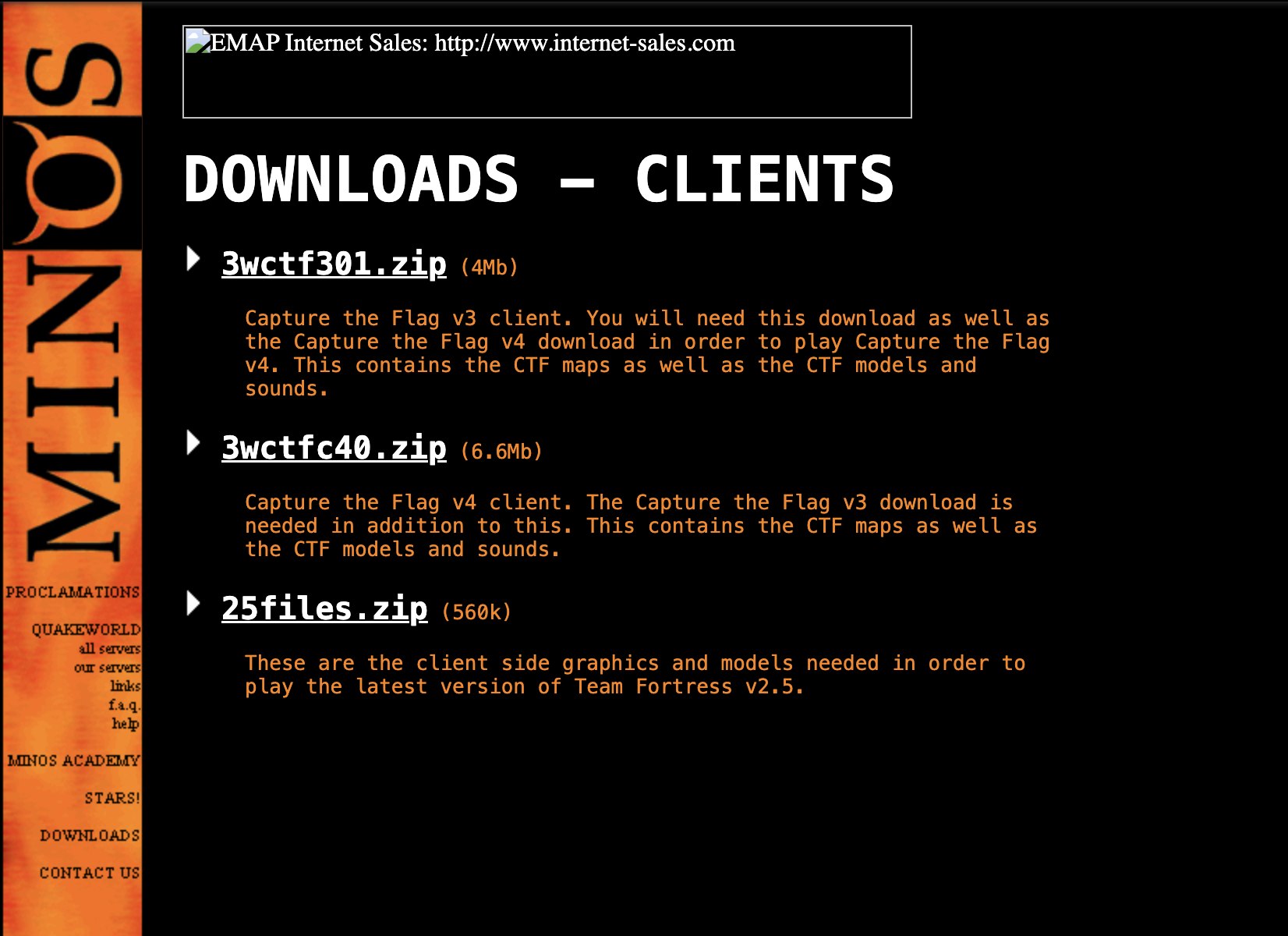
Figure: Example of downloads provided by the MINOS, the European QuakeWorld Master Server.
I have found evidence of missing releases, original filenames and even recoverable files in the Wayback Machine by exploring old server websites.
When you discover a historical server website, look for pages describing the modifications it hosted and any associated download directories.
Even an old server configuration page can identify a modification or version worth investigating.
Search Quake Clan Websites
Quake clans created an enormous number of websites during the 1990s and early 2000s.
Most contained member lists, match results, screenshots, news and information about competing clans.
They may not appear particularly useful for archival research at first.
However, some clans maintained download sections containing recommended modifications, patches, maps and other files used by their members.
These can be surprisingly valuable.
A clan website might preserve a download link to a modification that disappeared from its original homepage years ago. Occasionally, the Wayback Machine will have captured the file itself.
Look for sections labelled Files, Downloads, Patches or Links.
Also investigate links to other clans. These websites frequently linked to allies, opponents and multiplayer communities, providing additional sites to explore.
Explore International Quake News Websites
Much of the best-known historical Quake news came from large American gaming websites.
However, Quake had an international community, and many countries maintained their own news websites, forums and download collections.
These included German, French, British, Australian and numerous other regional Quake websites.
Some published original content, while others reported releases from international sources or maintained their own collections of downloadable files.
These websites are particularly interesting because they may preserve information or downloads missing from the better-known American sources.
Do not restrict your searches to English-language websites.
Search for regional Quake news websites, including sites written in other languages. A release announcement may be easy to recognise even when you cannot read the surrounding text, particularly when it includes filenames, version numbers or download links.
Once you find one regional news website, investigate its links section.
These websites often linked to other news sites in the same country or language. Following these connections can reveal entire networks of historical Quake websites that you would never encounter through conventional searches.
Follow the Links and Explore
There is no comprehensive index of historical Quake server websites, clan pages or international news sites.
You generally have to discover them through old news articles, Usenet discussions, archived links pages and references on other websites.
When you find a promising site:
- Browse its historical pages in the Wayback Machine.
- Look for download sections, file directories and release announcements.
- Follow links to related websites and historical mirrors.
- Investigate archived download URLs using the techniques described earlier in this chapter.
- Record useful sites and discoveries for future research.
Not every website will contain useful files. Most will not.
However, exploring these overlooked corners of the historical Quake community can reveal original filenames, missing releases and surviving downloads that are unlikely to appear in conventional archive searches.
Sometimes the most useful source for a missing modification is a website that was never intended to be a file archive.
Search Historical Developer Plan Files
During the 1990s, some game developers maintained personal .plan files containing updates about their work, projects and development activities.
These were plain-text files associated with the Unix finger command, which allowed other people to retrieve information about a user on a remote computer.
The practice became particularly well known through developers at id Software, including John Carmack and John Romero, who published updates about the development of Doom, Quake and other projects.
Other developers working at game studios also maintained .plan files, and some of these historical records survive today.
Why Plan Files Are Useful
A developer’s .plan file might contain:
- Announcements of upcoming releases and updates.
- Development progress reports.
- Technical details and implementation decisions.
- References to downloadable files and source code.
- Information about collaborators and related projects.
- Comments about discontinued or unreleased projects.
These records can provide contemporary evidence about software development that might not appear in surviving project websites or release announcements.
They are particularly interesting when researching developers who began in the Quake modding community and later worked on commercial games.
Be careful when interpreting this information. A developer mentioning a planned release does not establish that the release was ever made publicly available.
Find Archived Plan Files
One particularly useful collection is:
- Gamers.org Developer .plan Archive
https://www.gamers.org/pub/archives/plans/
A collection of historical.planupdates from id Software developers and others, including records from John Carmack, John Romero and developers associated with other game studios.
Another useful resource is:
- John Carmack .plan Archive
https://github.com/oliverbenns/john-carmack-plan
A collection of John Carmack’s historical.planentries, organised into readable Markdown files.
You may also find individual .plan entries reproduced in old gaming news articles, Usenet discussions and archived personal websites.
Search using developer names, historical email addresses, project names and distinctive phrases.
Below is an snippet of a .plan file by John Carmack:
[idsoftware.com]
Login name: johnc       (messages off)  In real life: John Carmack
...
Plan:
Quake is out.
Finally.
I think the end product is damn good, and I am proud of my 18+ months of
sweating over it.
I hope lots of you enjoy the shareware levels enough to register :-)
...
When you find a relevant entry, record its original date, source and any references to releases or downloadable files.
As with other historical evidence, distinguish the date of the original entry from the date it was copied or archived.
A developer’s .plan file can provide a valuable contemporary account of what was happening behind the scenes, including projects, releases and development work that might otherwise be difficult to reconstruct.
Investigate Every Known Download Directory
This is one of the techniques that has helped me most over the years.
As you research a modification, you will collect historical URLs where its releases were distributed.
Some may come from original project websites, others from news announcements, FTP archives, mirrors or readmes.
Record all of them.
Importantly, record download locations for both recovered files and releases you have not yet found.
Then examine the directory paths rather than looking only at the individual files.
For example, suppose your research has identified several historical download URLs:
http://example.com/quake/mods/qmatrix10.zip
http://example.com/quake/mods/qmatrix11.zip
http://mirror.example.net/planetquake/qmatrix/qmatrix12.zip
Remove the filenames to obtain the parent directories:
http://example.com/quake/mods/
http://mirror.example.net/planetquake/qmatrix/
These directories are now research targets in their own right.
Search for historical captures of each directory in the Wayback Machine.
If a directory listing was archived, inspect it for additional files.
You might discover an earlier version, an incremental patch, a supplementary download or a release that was never mentioned on the project homepage.
You may also discover unexpected files that suggest a different naming convention.
Look for patterns across download locations
Once you have collected several download directories, look for patterns.
Do multiple URLs share the same directory structure?
Does one server appear to be mirroring another?
Are there alternative hostnames that might use the same path?
Could a known PlanetQuake directory have been mirrored through ftp.cdrom.com or another historical FTP service?
These relationships can suggest new locations to investigate.
For example, if you know that one PlanetQuake release was copied into a particular FTP mirror directory, investigate whether that directory also contained earlier or later releases.
Search for the same directory on other mirrors.
This approach can turn a handful of historical download URLs into dozens of useful research targets.
Automate directory investigation
This is another excellent opportunity for automation.
A script could accept a list of historical download URLs and:
- Extract the parent directory from each URL.
- Remove duplicate directories.
- Generate known mirror and hostname variations.
- Search the Wayback Machine for archived directory listings.
- Download the available HTML listings.
- Extract filenames and file download URLs.
- Produce a report of files discovered across the different directories.
You could then compare the report against your known release filenames and wishlists.
This helps identify files that you did not know existed, as well as alternative copies of releases that are still missing.
It also turns your accumulated research into something more powerful than a collection of disconnected links.
Every historical download URL is a clue to an entire directory, and every directory may contain clues to other releases.
Reuse Research Across Archive Projects
Researching one modification often reveals information about others.
A PlanetQuake directory might contain links to related projects. A developer’s personal website might host several modifications. A CD-ROM listing might identify hundreds of Quake files.
Keep these broader discoveries where you can find them again.
For example, you might maintain a personal list of historical FTP mirrors, PlanetQuake hostname variations, unusual file archives and useful Wayback Machine search techniques.
Likewise, keep the scripts you develop for downloading directory listings, generating filenames and comparing archived files.
Try to make these tools reusable by accepting project names, URLs and search terms as arguments rather than hardcoding them for a single archive.
This investment becomes increasingly valuable as you create more archives.
You may revisit an earlier project with a new search tool and immediately discover files that you missed the first time.
You may also notice relationships between projects that were not obvious when researching them independently.
An obscure modification that originally seemed impossible to investigate might become much easier after you have worked on several other projects from the same period.
Follow Unexpected Leads
The research techniques described in this chapter are systematic, but many worthwhile discoveries begin with something unexpected.
You might find a file in a directory where it does not appear to belong.
A historical mirror might have an unusual naming convention. An old readme might mention a developer alias that leads to another website.
A CD collection might include files from a modification you have never heard of.
Do not ignore these clues simply because they fall outside your immediate search.
Record them in your notes and investigate when they appear promising.
At the same time, avoid following every possible lead indefinitely.
Some connections will produce nothing useful.
A good approach is to capture the information, make a brief assessment and decide whether it is worth pursuing now or saving for later.
As you gain experience, you will become better at recognising which leads are likely to be productive.
The most important skill is not memorising a list of websites or commands. It is learning to recognise relationships between files, directories, mirrors, developers and historical references.
Those relationships are often what lead you to material that conventional searches cannot find.
Chapter Summary
Historical websites can reveal Quake files and release information that conventional archive searches overlook.
The Wayback Machine’s CDX API helps uncover archived URLs, while investigating alternative PlanetQuake addresses can reveal additional snapshots. Server websites, clan pages, international news sites and developer .plan files offer less obvious sources of contemporary evidence.
Every historical download URL is also an opportunity to investigate a directory, related website or mirror. Recording discoveries, reusing research across projects and following promising unexpected leads can make later searches more productive.
Outcome: You can investigate obscure historical websites, discover overlooked download locations and follow research leads that conventional searches might miss.